Connect an NWC wallet
To read a balance, create an invoice or pay one, ask the user for a Nostr Wallet Connect connection. They create it in their wallet and choose what your app may do. The connection string contains the secret authorizing those operations; you don't need the wallet's account keys.
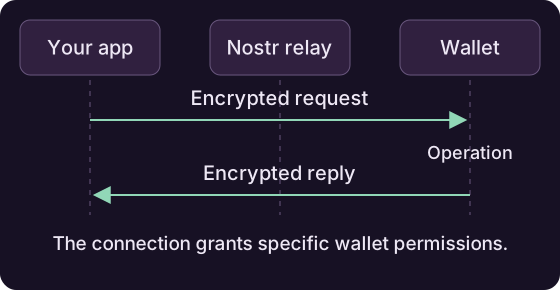
Connecting
Pass the nostr+walletconnect:// URI to NWCWallet, with either an existing pool or a new one owned by the wallet:
NWCUri uri = new NWCUri("nostr+walletconnect://...");

NWCWallet wallet = new NWCWallet(pool, uri);
// or: NWCWallet wallet = new NWCWallet(uri);   // own pool

if (!wallet.waitForReady().await()) {
    throw new IllegalStateException("Wallet service is not ready");
}
Inspect the connection's relay list, public key and other fields through NWCUri if needed; avoid logging the secret.
Reading state
long balanceMsats = wallet.getBalance(null).await();   // millisats
WalletInfo info = wallet.getInfo(null).await();        // advertised capabilities
List<String> methods = wallet.getSupportedMethods().await();
Check isMethodSupported(...) before offering an operation in your UI. If you already have a connection and only need its current readiness state, use isReady().
Each connection has its own permissions. Check them again when the user connects with a different permission set, and handle timeouts or failed requests in your UI.
Let the user pair through a QR code
NWCAuth supports wallets that understand nostr+walletauth:// pairing. Request only the methods the current feature needs; this read-only example asks for a balance and optionally wallet information:
NWCAuth pairing = new NWCAuth(
    List.of("wss://relay.ngengine.org"),
    "My app",
    List.of("get_balance"),
    List.of("get_info"));
try {
    AsyncTask<NWCUri> connection = pairing.awaitConnection(Duration.ofMinutes(2));
    showQr(pairing.getConnectionUri());
    NWCUri authorized = connection.await();
    NWCWallet linkedWallet = new NWCWallet(authorized);
    // Use the connection/readiness flow above; keep linkedWallet until disconnect.
} finally {
    pairing.close();
}
Paying and invoicing
// pay a Lightning invoice
PayResponse res = wallet.payInvoice(bolt11, null, null).await();

// create an invoice on the wallet
InvoiceProperties request = new InvoiceProperties(
    21_000L, "Nostr4J demo", null, Duration.ofMinutes(10));
InvoiceData inv = wallet.makeInvoice(request, null).await();

// spontaneous payment without an invoice
NWCKeysendResponse sent = wallet
    .keySend(null, amountMsats, recipientPubkeyHex, null, null, null)
    .await();

// look things up
InvoiceData seen = wallet.lookupInvoice(paymentHash, null, null).await();
List<TransactionInfo> txs =
    wallet.listTransactions(from, until, 20, 0, false, null, null).await();
Amounts are in millisatoshis. The final argument to these request methods is an optional expiry time (Instant, or null for none). Close the wallet when the connection is no longer needed.
Pool ownership
With new NWCWallet(uri), closing the wallet also closes its pool. With new NWCWallet(pool, uri), the supplied pool stays open; close it after its other users have finished.